

For over a decade, marketers have relied on what we once considered the "gold" standard of digital measurement: client-side tracking. This is the dynamic, real-time "Gold Rush" philosophy includes using vulnerable JavaScript to extract data from a user's browser (the client) and report actions to 3rd-party analytics suites.
However, that vulnerable standard has been eroded by an evolution of how the internet functions. Ad blockers, modern browsers, and privacy extensions now aggressively identify and block these very beacons and scripts.
To drive growth today, we must move past this unstable "Gold Rush" model. We must look beyond the browser and find a more resilient way to understand how people actually interact with our brands. It's time to bridge the gap between what the scripts see and what the users actually do and experience.
The path forward requires a surprising synthesis! Ready for it? Pairing durable, 'old school' custom page builds (creating unique, non-blockable assets linked directly to specific ads) with future-proof, 'new school' server-side data governance. Reclaiming your data governance at the source is the definitive growth solve for conflicted analytics.
Why Dynamic, Client-Side Personalization Fails in the Modern Web
| Concept | Traditional Client-Side Approach | Why It's Like a Gold Rush |
|---|---|---|
| Strategy |
| Wild Prospecting: Sending your user to a generic location and hoping your dynamic scripts can find "gold" (user profile data) and "extract" a personalized experience before they leave. |
| Philosophy | Assumes the browser (client-side) is a secure and reliable place to perform mission-critical dynamic logic. | Extraction from a Vulnerable Source: Believing you can dig anywhere for "gold" without structure or security. |
| Outcome |
| Data Loss, Noise, and Failed Campaigns: This model collapses because it relied on vulnerable infrastructure that is now heavily regulated and blocked. |
You have noticed the gap. Marketing teams are asking for clarity on conflicting reports, yet the major analytics platforms rarely discuss it. We call this the 'Data Fog' of the standard 'Gold Rush' model.
This is rarely a focus for them because these established systems rely on Including JavaScript beacons on a single, universal landing page. This dynamic client-side scripting is blockable by modern browsers, leading to invisible data and failed conversions.
They cannot easily present the structural solve (pre-built Asset Management pages + Server-Side Tracking) because it is a more advanced data governance solution than their standard, out-of-the-box tracking model supports. Reclaiming your metrics means looking past the standard setup to find a more durable data truth.
The collapse of that vulnerable, dynamic 'Gold Rush' scripting causes a profound business risk on two critical fronts. When the necessary JavaScript fails to execute in the client's browser, both your tracking and your personalization are simultaneously suppressed.
The Result: The total structural data collection problem requires a structural, server-side solve. Relying on vulnerable client-side scripting locks you into a blind spot, where you lose both the high-intent customer and the accurate data to understand why.
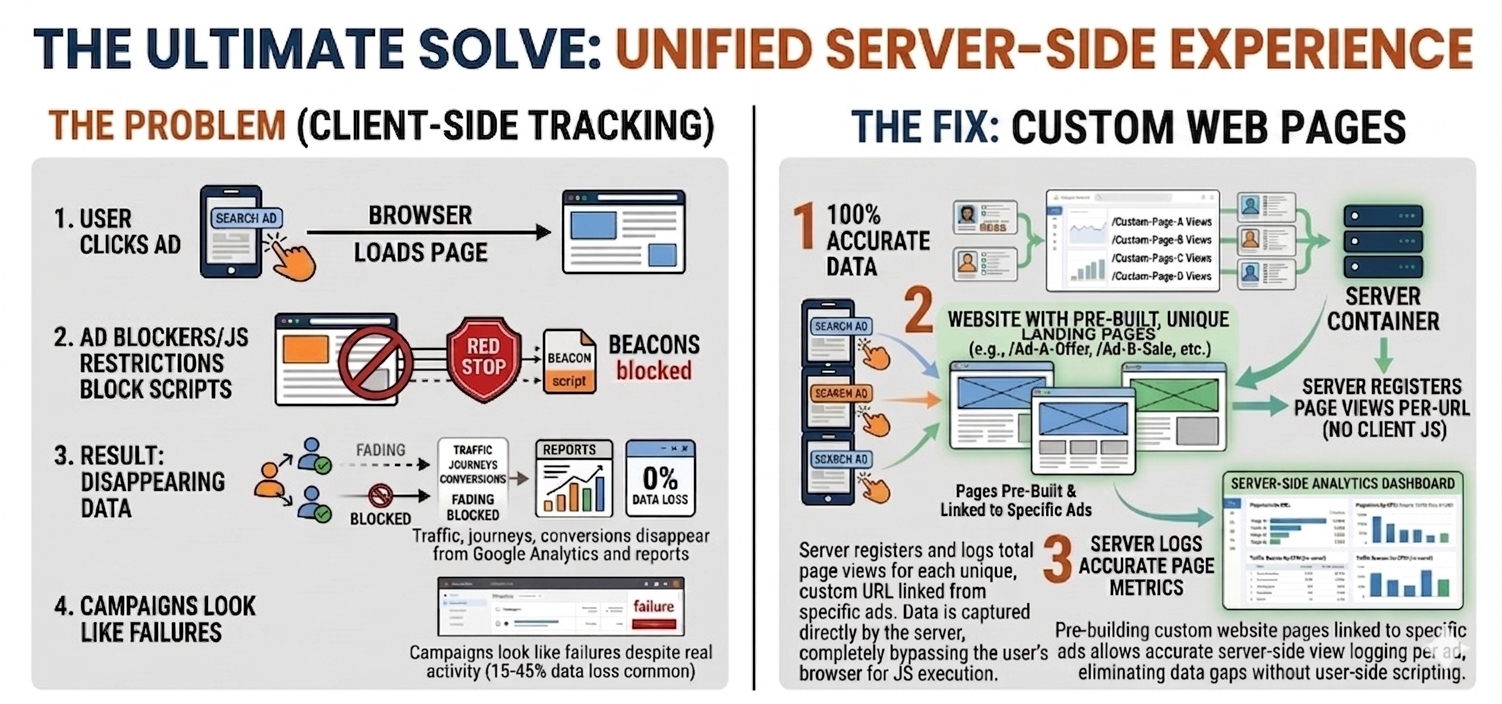
In the 'Problem' scenario, you will see a single, universal landing page (e.g., /generic-offer). The goal is personalization, so the page is loaded with JavaScript.
In the 'Fix' scenario, you will see pre-built pages that personalize experience into a unique asset, such as a **custom landing page for each ad** (e.g., /unique-custom-ad-A-offer).
To clear the data fog, we have consolidated the explanation into a powerful FAQ that directly answers the key confusion between tagging and tracking. We have then structured a stacked, one-by-one comparison of the code. This moves beyond the general concepts and shows you exactly where the tracking code lives and executes, so you can see why one is susceptible to blocking and the other is a robust "fix."
Yes, client-side tracking is frequently referred to as "tagging."
This is because "tags" are the essential tools used to make client-side tracking work. The terms are used interchangeably so often that "Client-Side Tagging" has become a standardized technical term in the digital analytics industry.
Here is a breakdown of why this connection exists.
A tag is a small snippet of JavaScript code.
Think of it as a pixel-sized digital container. This container holds the instructions that tell the user's browser how to collect data (e.g., page name, click location, cart items) and where to send that data (e.g., to Google's analytics servers).
When you use client-side tracking, your goal is to place these snippets of code into the HTML of every page on your website. Because you are adding many different pieces of code, we call this the act of tagging your site.
The two concepts are linked because client-side tracking relies entirely on the successful deployment and execution of these tags directly in the user’s web browser.
Step 2 ("AD BLOCKERS/JS RESTRICTIONS BLOCK SCRIPTS") highlights the critical vulnerability. Ad blockers and privacy tools don’t block abstract "tracking"; they specifically identify and block the known JavaScript files that serve as these client-side tags. Because the tags are blocked, the client-side tracking process fails immediately.
| Concept | Definition | Focus |
|---|---|---|
| Tracking | The overall goal: collecting data about user behavior. | The "What" and "Why." |
| Tagging | The technical implementation: placing JavaScript snippets (tags) on the site to execute that collection from the browser. | The "How." |
When we say "we are setting up tagging," we mean we are implementing the tools necessary to perform client-side tracking. Because they are the standard delivery mechanism, client-side tagging is the most common form of client-side tracking.
Analyzing the Data Supply Chain
This script is sent to the user’s browser. Ad blockers identify the source (e.g., analytics.js) and kill the script before it can fire.
/* Embedded in User Browser HTML */
(function(i,s,o,g,r,a,m){...})(window,document,'script','https://google-analytics.com/analytics.js','ga');

ga('create', 'UA-XXXXX-Y', 'auto');
ga('send', 'pageview'); // <--- Blocked by most privacy extensionsThe server logs the interaction internally. Since this code never touches the user's browser, it cannot be seen or stopped by ad blockers.
/* Executes on Private Server */
async function logServerSidePageView(clientId, url) {
  const payload = {
    client_id: clientId,
    events: [{ name: 'page_view', params: { page_location: url } }]
  };
  // Data sent securely from Server-to-Server
  await fetch(`https://google-analytics.com/mp/collect`, { method: 'POST', body: JSON.stringify(payload) });
}Instead of one "smart" page that uses JS to change, the server delivers a unique pre-built asset. The server knows exactly which ad was clicked because it is delivering that specific file.
/* Routing Logic on Server */
app.get('/unique-ad-A-offer', (req, res) => {
  // 1. Log the visit to the server-side guestbook
  logServerSidePageView(req.cookies._ga, req.url);

  // 2. Serve the unique HTML file directly
  res.sendFile(path.join(__dirname, 'landing-pages/ad-A-personalized.html'));
});You have seen the code, but the question remains: So What? How do these technical concepts apply to your day-to-day marketing strategy? The answer lies in how you choose to secure your data supply chain.
The Strategic Problem (Gold Rush) Relying on a single, generic landing page that uses risky 3rd-party JavaScript to *dynamically* build a personalized experience in the user’s browser. It is vulnerable, invisible, and blockable, leading to massive data loss and failed campaigns.
The Strategic Fix (Asset Management) Pre-building that personalized experience into a unique, secure asset—a **custom landing page for each ad.** The decision on what the user sees is fixed before they arrive, allowing your backend server to log the page view data instantly.
This is the core business decision you are facing. To move from the noise of dynamic client-side scripting to the clarity of robust server-side execution, you must pair a high-performance Asset Management marketing strategy with a robust Server-Side Tracking data collection engine to execute it. This unified solve secures your data governance at the source, providing the 100% accurate metrics you need to prove campaign ROAS and drive reliable growth.
You’ve seen the Node.js example showing how SST executes. But what are the real, performance-impacting benefits for your marketing campaigns? Why should you invest in this infrastructure? To ensure this technical shift translates into marketing results, we have consolidated the most vital questions into a clear, marketer-first FAQ.
No. They are different components of a complete data supply chain.UTM tags identify *where* traffic is coming from, but client-side beacons (scripts) are the tools required to *collect* and send that data. A full explanation is below.
A UTM tag (Urchin Tracking Module) is a piece of text attached to the end of a URL. These tags define "where" your traffic came from. For example, in the URL website.com/?utm_source=google, the UTM tag tells an analytics program that the user came from Google.
UTM tags are just part of the link itself. As shown in point 1 ("USER CLICKS AD") of the infographic, they are created instantly when the ad is clicked.
A client-side beacon (or beacon script) is a snippet of JavaScript code that executes in the user's browser. These beacons define "how" data collection happens.
Their job is to read data (like the page name and any present UTM tags), package it, and send it to an analytics server (e.g., Google). The distinction is made in point 2 ("DISTINGUISHING UTM TAGS VS. BEACONS") where they are listed as separate items.
The distinction is vital because client-side beacons are highly vulnerable to being blocked by ad blockers, privacy tools, and browser restrictions (as shown in point 2 of "THE PROBLEM").
When these beacons are blocked, the data that the UTM tags were identifying **never gets sent**. The traffic arrives at your site with the correct UTM parameters in the URL, but the script required to capture that data fails. This causes the data breakdown shown in step 3, making successful campaigns look like total failures.
| Concept | Definition | Role in the Chain | Vulnerability |
|---|---|---|---|
| UTM Tags | Text parameters appended to a URL to label the traffic source. | The "Where": Identifying the origin of the click. | Low: They are part of the URL. |
| Client-Side Beacons (Scripts) | JavaScript code that executes in the user's browser to collect and send data. | The "How": Executing the data collection and transmission. | High: Frequently blocked by ad blockers and browser features. |
The takeaway is that having excellent UTM tags is useless if you rely on vulnerable client-side beacons to collect the data. This is why a complete tracking solution must secure the execution of the data supply chain, typically through robust **server-side tracking** (as shown on the right side of the infographic).
You’ve seen the Node.js example showing how SST executes. But what are the real, performance-impacting benefits for your marketing campaigns? Why should you invest in this infrastructure? Here are the four key questions your marketing team should be asking about server-side tracking.
Yes, 100%. This is the primary problem SST solves.
Ad blockers and browser privacy tools are designed to identify and block the 3rd-party JavaScript "beacons" (like the standard Google Analytics snippet). In the client-side model, your site sends that script to the browser, which is immediately blocked.
In the server-side model, **no tracking script is ever sent to the browser**. The entire page view is registered when your own server receives the page request. Ad blockers cannot stop this process because they only have jurisdiction over the user’s browser, not your server. This is why the infographic correctly lists SST as providing **100% Accurate Data**.
Yes, significantly. SST provides a secure and reliable data supply chain for your UTM tags.
Relying on client-side beacons means that even when a user arrives with perfect UTM tags, the script required to send that data can be blocked, making it look like you received random organic traffic.
In the SST model, your server can capture and log the full URL—including all UTM tags—instantly, *before* the browser can interfere. This is how the diagram can show individual ad URLs, e.g., `/Ad-A-Offer` and `/Ad-B-Sale`, being perfectly mapped and registered on the 'SERVER REGISTERS PAGE VIEWS PER-URL (NO CLIENT JS)'.
| Benefit | Marketer Impact | Why it happens with SST |
|---|---|---|
| Increased ROAS & Efficiency | Make better budget decisions based on full, unblocked data. | We secure accurate conversion data, ensuring we can prove campaign performance. |
| Faster Page Load Times | Improved user experience and potentially higher conversion rates. | We remove multiple 3rd-party tracking scripts from the browser, allowing the page to load faster. |
| Robust Attribution Modelling | A clearer picture of the user journey, even across multiple sessions. | We can use secure, first-party server cookies that resist browser-level expiration rules. |
| Better Data Governance | Control over exactly what data is sent and to whom, enhancing compliance. | Data collection is consolidated on our trusted server, not distributed to multiple client scripts. |
Yes, it is harder and more expensive to implement than client-side tracking, but the ROI on accurate data is massive.
Implementing SST is not just placing one snippet of code. It requires a fundamental shift from simple JavaScript to backend engineering.
Your team will need technical expertise in backend programming languages like **PHP, Python, or Node.js** (as demonstrated in your code example). You will also need to secure reliable server resources (like your own dedicated **Server Container**) and set up secure authentication with your analytics provider using tools like the **Measurement Protocol**. It's an investment in robust data infrastructure.
You are noticing the confusion. Why are my metrics so conflicted? Is it because my marketing team set up the UTM Tags wrong? No.
The core challenge is not the label (UTMs); it’s the data supply chain. A full explanation is below.
A UTM tag is text paramètres attached to the end of a URL (e.g., website.com/?utm_source=google) to label where the traffic came from. As Shown in point 1 of current 'THE PROBLEM' infographic ("User Clicks Personalized Ad"), these tags are created instantly at the moment of the click.
A client-side beacon is a snippet of blockable JavaScript (like the standard GA snippet) that must execute in the user’s browser. Its only job is to 'read' that URL, packaging those UTM parameters, and sending them to an analytics server (e.g., Google Analytics) for analysis.
This distinction is vital. As Step 2 of 'THE PROBLEM' identifies, ad blockers don’t block abstract 'tracking' or UTMs; they block the known JavaScript beacons required to deliver that data. This is how a high-intent campaign with perfect UTM tags can look like random organic traffic, creating the unshakeable data noise and fog your team is experiencing. Relying on vulnerable client-side scripting locks you into a blind spot, where you lose both the customer and the accurate metrics to understand why.
The first step in clearing the "data fog" is cross-validation. While client-side tools like 3rd-party analytics suites can be blocked, your server logs, the raw HTTP requests processed by your backend, cannot. By comparing these two sources, you can quantify the true data noise your shop is experiencing.
To move past the unstable "Gold Rush" model, move your tracking logic from the user’s browser to your own server. This executes data governance on your backend using solutions like Node.js or Stape, instead of relying on blockable 3rd-party beacons.
The "fix" isn't dynamic JS. It is a long-term Asset Management strategy. Instead of relying on risky script execution in the client browser, pre-build that dynamic logic into unique, secure assets—a **custom landing page for each ad.
/Ad-A-Offer). This fixed decision ensures the server can instantly deliver personalized content and log that event directly.Third-party tools for session replays and heatmaps are essential for UX, but they are highly susceptible to blockers. To ensure these insights are reliable, test them in **parallel against your backend server-side metrics** to ensure you aren't making decisions on skewed data.
When A/B testing new designs, relying on client-side data can lead to skewed results if one variation triggers more blockers than another. Design tests using **server-side metrics**—paired with non-JS heatmaps—to ensure every user path is counted, clearing up the data fog.
Moving from Client-Side Tagging to Server-Side Collection isn't just a fix for "missing data" as it is a fundamental shift in how your organization handles user privacy and international standards like GDPR.
Instead of allowing 3rd-party scripts to "scrape" user data directly from the browser, your server acts as a Privacy Buffer. You can scrub sensitive info (like IP addresses) before it ever leaves your secure environment.
Every "tag" added to a browser slows down the page. By moving that logic to the server, you reduce the "weight" of your website, leading to faster load times and a smoother experience for the end user.
When a user interacts with your custom page, the Step 2 Fix ensures that your "Digital Guestbook" is updated internally. You are no longer relying on the user's browser to "behave" or follow instructions from a third party. You own the interaction from start to finish.
"Your marketing data is currently being filtered by browser privacy tools before you ever see it, creating a 'Data Fog.' By moving to a server-side architecture, you reclaim 100% of your data accuracy while continuing to use the 3rd-party tools you rely on."
We are initiating a Server-Side Tracking (SST) migration. This allows you to:
Yes. You don't have to quit Google Analytics or Meta Ads. You are simply changing how those tools receive their data:
The unstable "Gold Rush" philosophy, relying on vulnerable JavaScript prospecting in the browser to extract real-time data, has collapsed under the weight of privacy evolution and ad blockers. When our dynamic scripts fail to execute in the client, we lose sight of what the user is experiencing.
The path forward is infrastructure. The true Unified Solve requires pairing a high-performance Asset Management marketing strategy (pre-built, unique assets) with a robust Server-Side Tracking data engineering solution to execute the tracking on your secure backend. This clears away the data fog, providing the unshakeable clarity needed to prove ROAS and build experiences that truly resonate with your audience.
Don’t let conflicting data and analytics mysteries dictate your marketing strategy. YellowHammer IT can help your team create a simplified action plan that accounts for the authentic user journey.
Contact YellowHammer IT Today The information and code samples provided in this article are for educational and illustrative purposes only. Implementation of Server-Side Tracking (SST) involves significant changes to your data infrastructure. While SST can enhance data accuracy and privacy control, YellowHammer IT does not guarantee specific performance increases or absolute immunity to all ad-blocking technologies.
Furthermore, compliance with data privacy laws (such as GDPR, CCPA, or HIPAA) depends on your specific business location, user base, and data handling policies. This article does not constitute legal advice. We strongly recommend consulting with your legal counsel and technical team before deploying these solutions in a production environment.